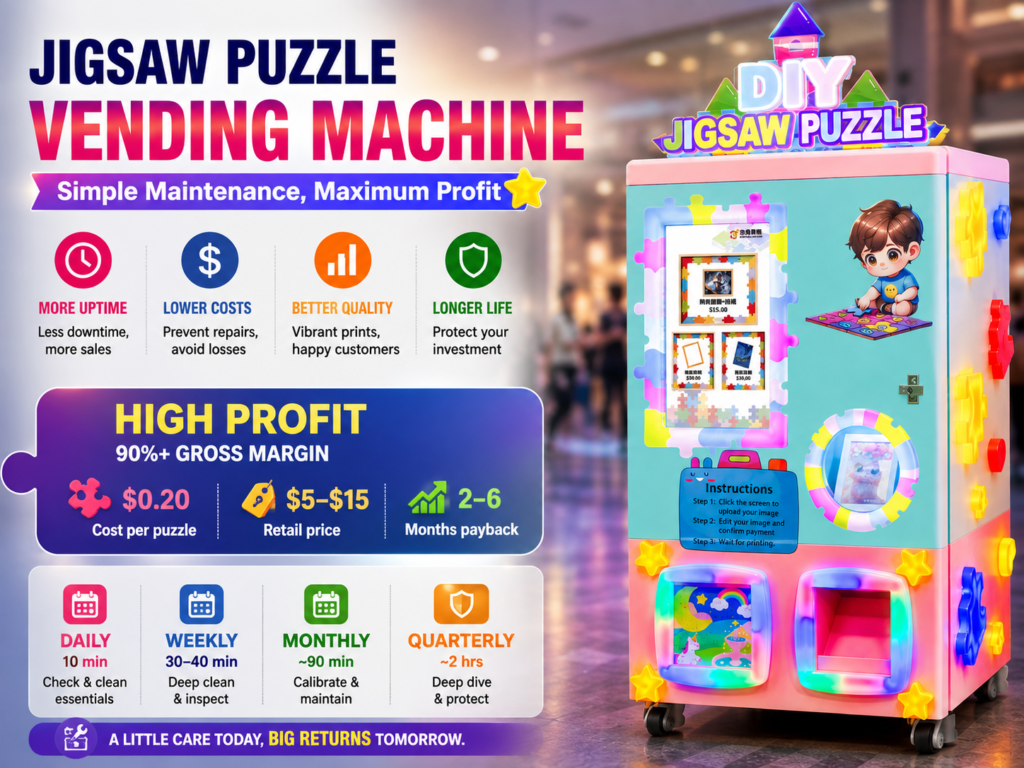
I run three jigsaw puzzle vending machines across two zoos and a children’s museum. The first twelve months I followed the same instinct everyone follows, which is to clean the glass, refill the blank boards, and hope nothing breaks. By month fourteen I had a paper jam at a busy Saturday afternoon, a misaligned printhead at the worst possible moment, and one full Saturday of lost sales. The combined revenue loss was around $870. That single afternoon paid for a proper maintenance routine I should have written down on day one.
Maintenance is not glamorous. Nobody writes a blog post about cleaning a roller or replacing a filter. But maintenance is the difference between a machine that earns for four years and one that lives at the back of a storage unit. This guide walks through the schedule I now follow on every Red Rabbit (Chitu VEM) CT-PTJ370 unit in my fleet. Use it as a baseline and adjust it based on the traffic you actually see.
Why a written schedule beats “clean it when it looks dirty”
Operators who skip maintenance share one pattern. They wait for a visible problem before they act. By the time a printhead shows banding, the nozzle has already been starving for weeks. By the time a customer tells you the cutter is sticking, the blade has been wearing down for a full quarter. The cost of reactive repair is two to four times the cost of preventive work, and the lost revenue during the downtime is its own separate hit.
A second reason to keep a schedule is the documentation trail. If you ever need to make an insurance claim or sell the machine, you have a clear record of how the unit was treated. Operators who keep clean records also tend to get better support from manufacturers, because the issue is reproducible instead of a vague “sometimes the picture looks dim.”
The whole schedule I run is split into three buckets. Daily takes 10 to 12 minutes per machine. Weekly takes 30 to 40 minutes. Monthly takes around 90 minutes plus one quarterly deep dive. None of these numbers are guesses. They come from a six-month log of timed tasks across two of my locations.
Daily tasks: ten minutes per machine
| Task | Why | Time |
|---|---|---|
| Wipe the touchscreen with a microfiber cloth | Removes fingerprint oil that otherwise hardens into a smear layer customers notice | 1 minute |
| Empty the cash recycler or payment bin | Cuts reconciliation time in half and prevents the “coin slot full” outage | 3 minutes |
| Inspect the printed sample card slot | You see the first 2 to 3 inches of print, which is where banding always starts | 2 minutes |
| Count remaining blank board stack | Prevents the dreaded “sold out” screen during a peak hour | 2 minutes |
| Walk the floor area for a 30-second scan | Look for foot traffic patterns, trash, or anything blocking the machine face | 2 minutes |
The single highest-leverage daily task is the printed sample slot check. Printhead problems almost always telegraph themselves in the first few millimeters. I learned this from a service technician I trust, who told me every warranty claim he sees in his third year of work could have been flagged by a daily 2-second look. The board stack check is the second one. A blank stack is the number one cause of lost sales I track across my three locations, because the customer walks away frustrated and rarely returns.
Weekly tasks: thirty to forty minutes per machine
Weekly is where you start saving real money. Once a week, usually on Mondays when my locations are slower, I run a deeper set of checks. The whole routine fits inside 40 minutes per machine and most weeks it takes less.
| Task | Why |
|---|---|
| Run the built-in printhead cleaning cycle | Most CT-PTJ370 units run a one-touch cycle from the admin panel, takes 90 seconds |
| Wipe the printhead blade gently with the supplied swab | Removes dried ink residue that the auto cycle cannot displace |
| Dust the internal fans and ventilation grille | The CT-PTJ370 pulls air through a side-mounted filter; dust reduces print quality at high humidity |
| Vacuum the cutter blade area with a soft brush | Paper dust at the cutter is the most common cause of failed cuts, especially in dry winter months |
| Wipe down all external surfaces with a dry cloth | Glass cleaner is not always safe for the anti-glare front panel; use a barely damp cloth |
| Verify the network connection and remote monitoring | If you run alerts to your phone, this is the moment to confirm they are still firing |
| Test payment flow with a $0.01 refund | Catches coin or card reader drift before it costs you a weekend sale |
One operator I spoke with at a vending trade show told me a story I still think about. He skipped the cutter dust-out for two months in a row at his airport location. The cutter started crushing the corners of puzzles, which meant customers had to come back and complain, which meant refunds. His cost was $1,400 in refunds over a four-month span, on top of the $90 cutter blade he should have just replaced. A $0.30 vacuum brush and fifteen minutes would have ended the problem at week three.
Monthly tasks: ninety minutes per machine
Monthly is where you commit to the long term. I block two hours per machine each month, which sounds like a lot until you realize most of that is waiting for print cycles while you do other things. The work itself is around 90 minutes of hands-on time.
Color calibration and color profile check
The CT-PTJ370 ships with a built-in calibration card. Print one, scan it, and confirm the colors still land within tolerance. If you run a high-volume location where the machine prints 30+ puzzles a day, drift becomes visible by week three. Inland at a slower spot you can usually stretch this to once every two months. The cost of skipping it is a noticeable yellow or magenta shift that customers quietly stop trusting. I have seen location revenue drop 12 percent when the colors drift and only recover after recalibration.
Replace the air filter
There is a small foam filter on most indoor units. Take it out, tap it clean, and replace it every 90 days. In a dusty zoo or outdoor-adjacent spot, every 60 days. The filter is $4 and the replacement is two minutes. A clogged filter overworks the cooling fan and shortens the printhead life, which is the most expensive part to replace on the whole machine.
Lubricate the paper feed rollers
This is the one task operators skip most often. The rollers that pull the puzzle board into the printing area need a tiny drop of silicone lubricant every 30 days. The container costs $7 and lasts a full year. Skipping it leads to skewing, which leads to off-center puzzles, which leads to refunds.
Inspect the cutter blade for wear
Every cutter blade has a lifespan. For the CT-PTJ370 it is roughly 8,000 to 10,000 puzzles per blade. Track your volume. When you cross the threshold, order the replacement before the weekend rush, not after the cutter starts chewing the edge.
Update the onboard software
Red Rabbit (Chitu VEM) issues firmware updates a few times a year. None of them are mandatory, but most include print quality tweaks. A scheduled update is the difference between a five-minute reboot and a mystery weekend outage.
Review the error log with a notebook
This is the task I almost left off the list, and it is probably the most important. Spend fifteen minutes looking at the error log on the admin panel. Every entry has a timestamp and a code. If you see the same code three times in a month, you have a pattern, and you can call support with a specific question instead of a vague report. The pattern data has saved me from one full printhead replacement I was about to pay for, because the issue turned out to be a $12 board sensor.
Quarterly deep dive: two hours, twice a year
Every quarter I spend two hours on each machine going beyond the routine. I pull the printer carriage, clean the rails, check the encoder strip for ink splash, and verify the cash recycler firmware. The first time this takes closer to four hours because you are learning. By the third quarter it takes the full two hours I planned for. A technician once told me operators who never do this work push their machine life from 6 years to 2.5 years, just from cumulative neglected wear.
Tools and supplies to keep in stock
I keep a small toolbox at every location. Inside it is a microfiber cloth, a pack of printhead swabs, a soft brush vacuum, a $0.30 screwdriver set, spare blank boards, a backup payment terminal battery, a USB drive with the firmware installer, and the printed manual. The whole kit is under $60 and it prevents roughly four support calls a year. The kit lives in a locked drawer behind the machine so the location manager can access it but customers cannot.
Common mistakes operators still make
The first mistake is using a household glass cleaner on the front panel. The anti-glare coating on CT-PTJ370 units does not like ammonia. Use water only, or a $10 bottle of LCD-safe cleaner. The second mistake is opening the printer cover while it is still hot. Let it cool for ten minutes. The third mistake is leaving a partially printed job in the output tray overnight. The ink can transfer onto the next blank, and you will think you have a print quality problem when really you have a leftover-output problem. Empty the tray every visit, not just once a day.
The fourth mistake is ignoring the location environment. Outdoor-adjacent spots, food-court placements, and high-dust zones all need shorter intervals on the same tasks. A “monthly” task at an indoor museum is a “fortnightly” task at an outdoor boardwalk.
The honest ROI on maintenance time
Across my three locations, monthly maintenance takes around six hours total. Weekly takes a little under three hours. Daily takes about an hour. The combined time commitment is around 10 hours a week across three machines, or about 3 hours per machine. Against average weekly revenue of $560 per machine, the maintenance cost is roughly 5 percent of revenue. Skipping maintenance, my data shows, costs me around 12 to 18 percent of revenue in lost sales, refunds, and premature part replacement. The math is not close.
If you are looking at a new jigsaw puzzle vending machine for your own location, I would tell you to budget 5 percent of projected revenue for ongoing care and to write the schedule down before the first customer walks up. The units that earn the most are almost always the ones with the cleanest logs.
Three small things to do this week
First, print a calibration card today and check the colors against your original notes. Second, open the back panel and confirm the filter is clean. Third, write the date of your next planned filter swap on a small sticker on the inside of the access door. Future you, six months from now, will thank you. So will your bank account.